
Every contract in the platform has a RAG (Red, Amber, Green) status. The RAG status is defined by the review (Contract Review Date) and expiry (End Date) of a contract.
Default settings:
- Amber review = 14 days
- Red Review = 7 days
- Amber expiry = 90 days
- Red expiry = 30 days
Based on the platform default settings, the flag of a contract is:

- Green, when the contract is not close to the review or end date;
- Amber reviewing, when the contract’s review date is within 14 days from today;
- Red reviewing, when the contract’s review date is within 7 days from today;
- Amber expiring, when the contract’s end date is within 90 days from today;
- Red expiring, when the contract’s end date is within 30 days from today;
The sequence of the RAG statuses does not change.
- A contract will be Green at first.
- 14 days before the Contract Review date, the contract will turn to Amber Reviewing.
- After one week, i.e. 7 days before the contract review, the contract will turn to Red Reviewing until the next status change.
- 90 days before the contract expiration date the contract will become Amber Expiring. This status will last for 60 days.
- 30 days before the expiration date, the contract will become Red Expiring. After the Expiration date passes, the contract will remain Red Expiring as long as the contract has contract status live.
Exception: if the contract review date and the contract expiration date are less than 90 days apart, the contract review date is overcome by the system, and the RAG status is based only on the Expiration Date. So the RAG status of the contract will become Amber Expiring instead of Amber Reviewing.
Please note that the above RAG statuses apply when the contract status is Live.
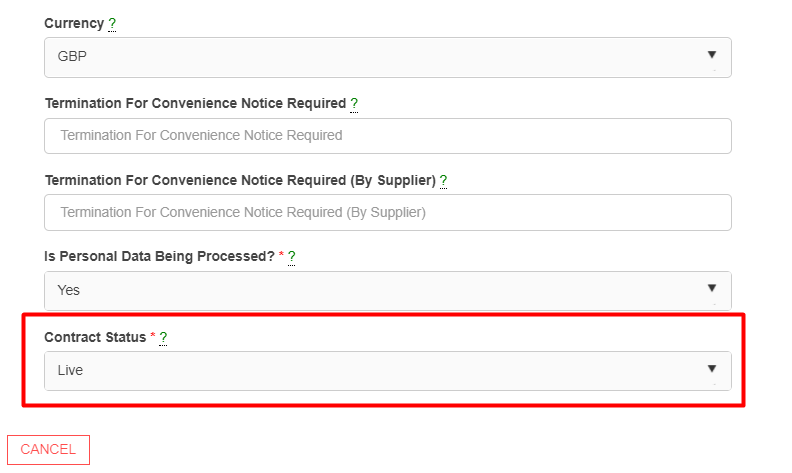
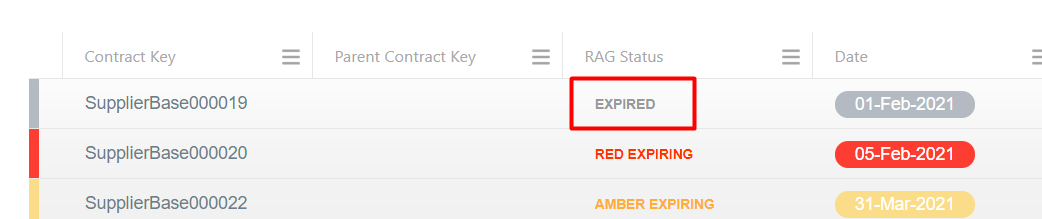
If the contract status is changed to Expired, then RAG Status will also change to Expired.
IMPORTANT NOTE:
The contract RAG status settings above are indicative. They can be configured to meet your preferences. Please speak to your system administrator and / or submit a support request at Zendesk if you would like to configure your contract RAG Status settings.