
When creating an action, a pop up window appears. 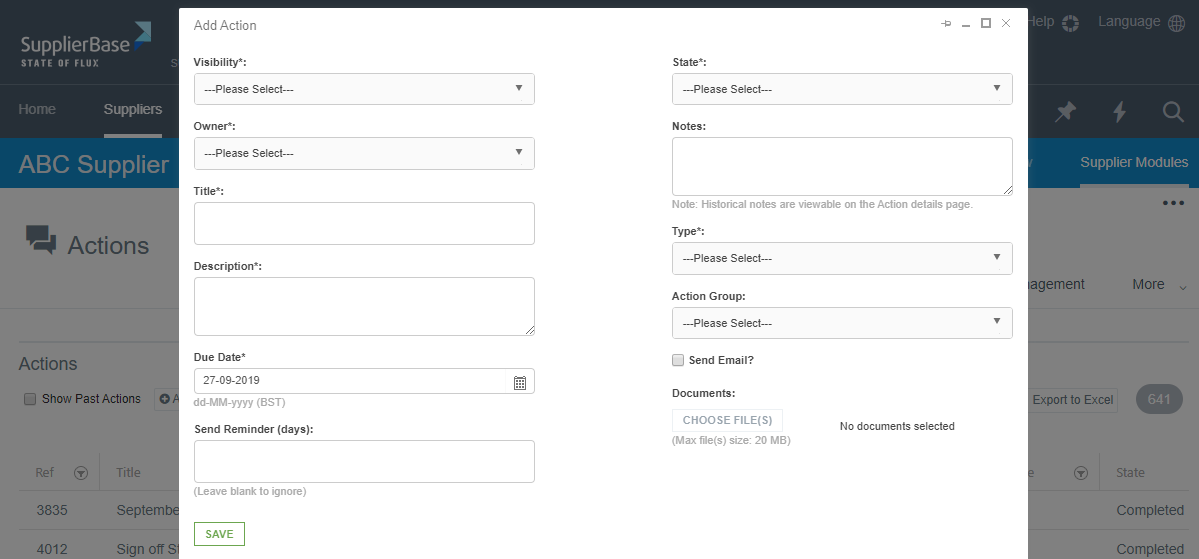 Below are some of the key fields in this window:
Visibility: Internal-only actions are not visible to suppliers; supplier-shared actions are visible to all users.
Owner: who is responsible for carrying out the action
Title: the title of the action (allows for easier search)
Description: details of the action
Due date: the date by which the action must be completed
Send Reminder (days): the number of days prior to the action due date that the action owner will receive a reminder email
State: if the action is new, completed, in progress etc
Notes: additional comments on the action
Type: what is the action related to, e.g. performance, projects etc.
Action group: the group related to the action
Send Email: When users add or edit an action, the Send Email checkbox will send an email to the action owner when the action is saved
Documents: any relevant documents
NOTE: The due date defines the RAG (Red, Amber, Green) status of the action.
Green when the action due date is beyond 14 days from today; action is completed or no longer required
Amber when the action due date is within 14 days from today
Red when the action due date is in the past