
Overview
In the Reports, there are 8 dashboard pages, in which the users can create dashboards.
The creation of dashboards and widgets is the same across all pages, the main difference is in the access of the dashboards, in terms of creation and visibility permissions.
Below you will see a table which summarises the differences among the pages.
Dashboard pages summary
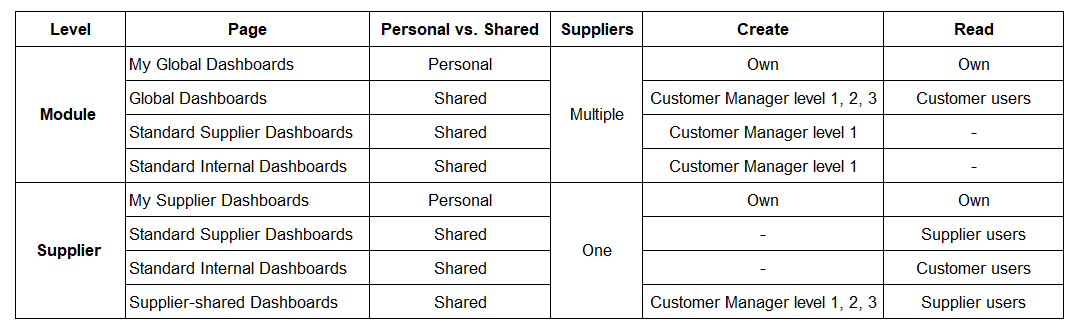
Dashboard pages explained
My Global Dashboards and My Supplier Dashboards
These dashboard pages are private to the user and not visible by other users. Every user has his own personal dashboards. The My Global Dashboards page, at the module level, is a page in which users create personal dashboards that include data for all or multiple suppliers. The My Supplier Dashboards page, at the supplier level, is a page in which users create personal dashboards that include data for one supplier.
Global dashboards
The Global Dashboards page, at the module level, is a page in which super users (e.g. system administrators) create dashboards that other internal users (e.g. customer users only) can read-only. This page is shared and all users that have permission to access this page can view the same dashboards.
Standard Supplier Dashboards
At the module level, this is a page in which super users (e.g. system administrators) create dashboard ‘templates’ that are replicated for all suppliers at the supplier level.
At the supplier level, this is a page in which customer and supplier users can read only the dashboards that super users have created centrally. This dashboard is read-only, same for all suppliers. It is mirroring the dashboard template that a super user can create centrally but it shows data only for one supplier.
Standard Internal Dashboards
At the module level, this is a page in which super users (e.g. system administrators) create dashboard ‘templates’ that are replicated for all suppliers at the supplier level.
At the supplier level, this is a page in which customer users can read-only the dashboards that super users have created centrally. This dashboard is read-only, same for all suppliers. It is mirroring the dashboard template that a super user can create centrally but it shows data only for one supplier.
Supplier - Shared dashboards
The Supplier Shared Dashboards, at the supplier level, is a page in which customer users assigned to the supplier create supplier dashboards that supplier users have read-only access to.