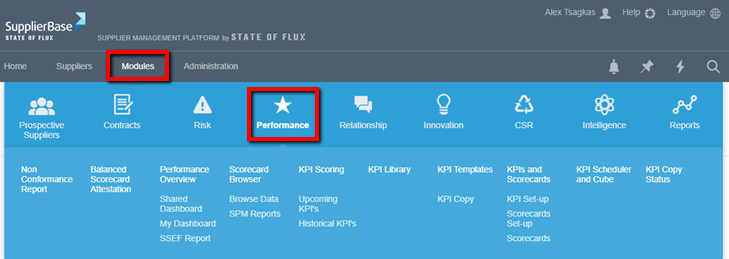
Supplier Level
- Overview – a dashboard displaying graphs and tables of performance results.
- Scorecard Browser – a report engine that outputs the performance of a supplier into a table or graphical view.
- KPI Scoring – a scoring page, for users to input their KPI scores or view historical scores.
- KPI Setup – create KPIs for a supplier and apply various settings.
- Weights & Targets – apply weights to KPIs.
- KPI Default Stakeholders – define those who should be scoring KPIs that have been created from the KPI Templates page at the Module Level.
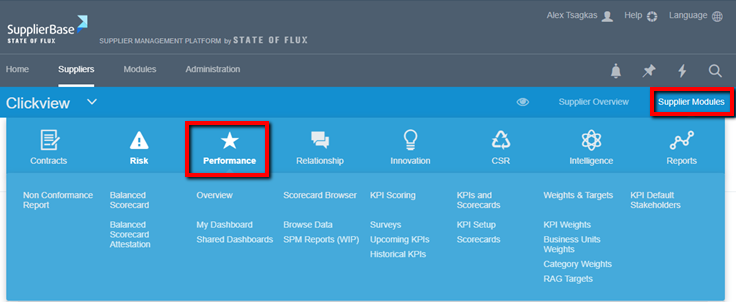
Module Level
- Performance Overview – customisable dashboards showing the performance of all suppliers.
- Scorecard Browser – report engine that outputs the performance of all suppliers in a graph or table.
- KPI Scoring – a scoring page showing all of the user’s upcoming and historical KPIs.
- KPI Library – a list of KPIs structured in a tree format, this forms the foundation of all performance management.
- KPI Set-up – a view and bulk edit capability of all KPIs in the platform.
- KPI Templates – list of KPI templates that can be copied to multiple suppliers in bulk.
- KPI Scheduler and Cube – access to the automated (once a day) processors that give rise to KPIs and allow them to be reported on.
- KPI Copy Status – an audit of all KPI templates that have been copied to various suppliers.